Refund management
Every refund request checked against the purchase
Refund requests arrive with the purchase, the policy the customer accepted and the full conversation. Your team decides quickly, inside the limits you set.
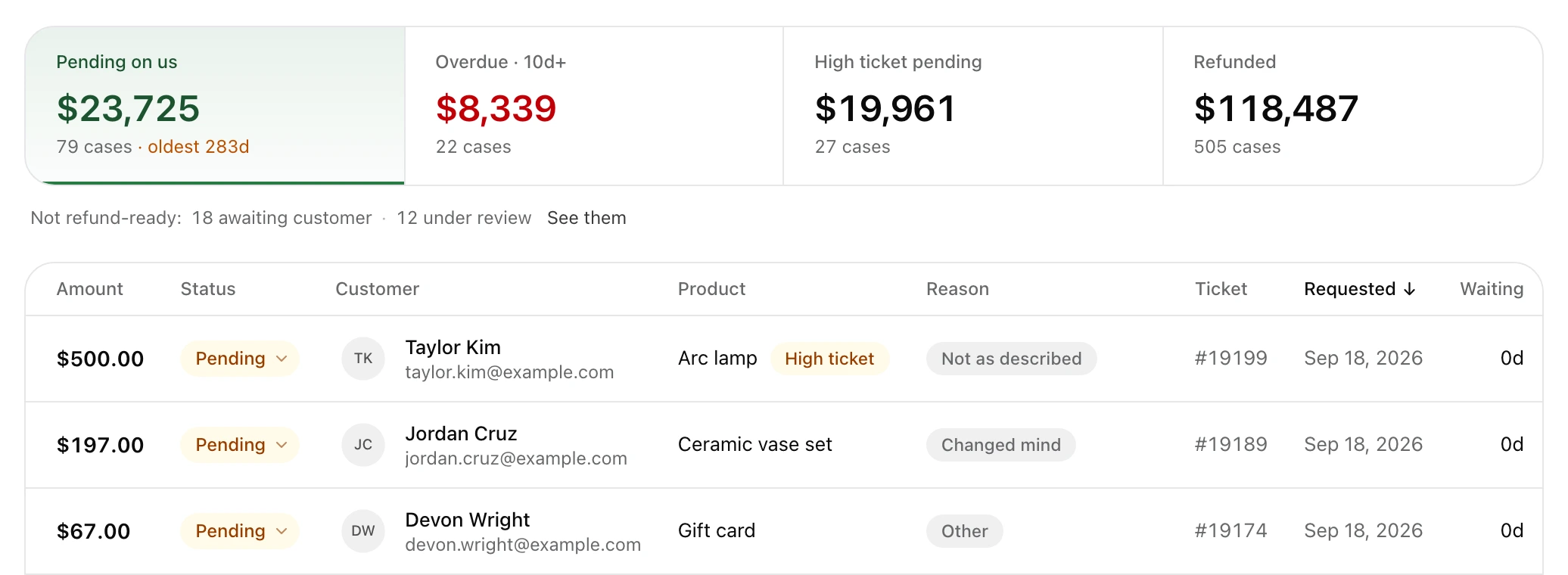
See what is owed and what is overdue
One view shows pending refunds, overdue cases and high-ticket requests, each matched to the original sale.
- Pending, overdue and refunded totals
- Each request linked to its order
- Filters by product, reason and amount
Limits your team works inside
Set refund limits per agent and a daily limit per brand. Larger refunds go to a manager for approval.
- Per-agent refund limits
- Daily limits per brand
- Manager approval for high-ticket refunds
Nothing waits without someone knowing
A Slack digest each weekday morning shows what is waiting to be paid, so approved refunds actually go out.
- Weekday Slack digest
- Requests from your store, course platform and community
- Refund reasons tracked by product
See Frontline on your own tickets
Book a demo and we will show you how Frontline handles your store, your channels and your policies.